Category Archives: Ayrstone Products

Posts about Ayrstone Products

The End

Ayrstone Productivity is out of business; we stopped operations on June 30. We still have some leftover products for sale on Ebay.com; see user “ayrstoneproductivity” to see what we have left and to buy the remaining Ayrstone products, as well as things like Ethernet cables.

I have moved the Ayrstone.com website and this blog to a (much) less-expensive server, so the information there will continue to be available, including the troubleshooting and support information. AyrMesh.com will probably still be available until the end of August, but it will just disappear. Support.ayrstone.com (our Zendesk support platform) will also disappear, and there will be no one to answer any questions.

The troubleshooting and debugging information is on Ayrstone.com; if you are having trouble making the transition from AyrMesh.com to manual configuration, there are pretty comprehensive instructions available. One warning: read the directions FULLY and follow them CAREFULLY for best results.

What happened at the end of June

At the end of June, we sent a small script to all the AyrMesh devices that saved their current configuration and then turned off the checkin to AyrMesh.com. Unfortunately, I messed it up and not all devices saved their configuration, which caused them to revert to the default configuration when they rebooted. I corrected the script, but many devices were affected. You can re-initialize the devices as long as AyrMesh.com is still running (at least through August, 2026) and recover them that way. Devices will check in to AyrMesh.com once, then drop off fully configured for manual configuration. You may not need to ever log into it again; if you do, you’ll use your AyrMesh.com username and password. IMPORTANT: if your AyrMesh.com username or password, or your SSID or passkey contain non-alphanumeric characters, change those fields before you click “submit” or the device may corrupt those fields.

Philosophical notes

We started this company because we could see the increasing role that data was having, even in 2010, in farming. The initial idea for this came when I had been working on ways to get RTK corrections quickly and reliably out to equipment in the field with the old “Freewave” 900 MHz. radios. There were already rumblings about the “Internet of Things,” which relies on good, widespread wireless access. I felt that meshing WiFi was a good, cheap, simple way to get wireless coverage across a farm for RTK, and it would have many other useful applications. I tested the idea and was even more convinced that it was a good approach; in a relatively radio-quiet environment the range of a “tuned” WiFi radio was surprising. Nothing in the following 16 years has dampened that belief – and I still believe AyrMesh delivered a good, inexpensive solution to spreading a wireless network across a farm.

There were problems, and they will remain for anyone who decides to try following in our footsteps. Installing the Hubs (access points) “up high and in the clear,” as we put it, is a challenge for a lot of users. There were a lot of folks who tried mounting the Hub on the side of the house and then were disappointed when the range was not what they expected. There were people who connected Hubs to networks that were not working right (or used the Hubs to extend signal to devices that “broke” the network), and then wondered why the Hub kept breaking down. I published my “Everything You Need to
Know About Networks and Routers (probably…)” slideshow
to help folks understand how to use their networks, which sometimes helped. Getting people to follow the directions (“Yes, the Hubs need to be AT LEAST half a mile apart if they’re going to work well”) remained a challenge.

By far my most common problem and biggest disappointment was Ethernet cables. I cannot express how much I came to despise bad Ethernet cables. They caused an endless stream of problems – the customer would complain their Hub was not working, but worked fine when it was brought down and connected to the power supply with a short cable. There are people who sell cheap “CCA” (Copper-Clad Aluminum) Ethernet cables (and other poorly-made cables) on Amazon, and I want to do terrible, terrible things to them.

But there were also other disappointments worth mentioning. First is the quality of the hardware we bought. We started out buying radios from Ubiquiti, which contracts manufacturing to several plants in China and supervises the manufacture of their products carefully. The hardware still failed from time to time, but they were generally good about replacing it. When Ubiquiti got in trouble and exited the “OEM” business, we were forced to buy radios from other vendors. Some had higher quality than others, but it was clear that no one was sending us their best units. We caught a lot of problems with the radios we purchased, but there were some cases where we got units that didn’t fail until they were out on the field. That was both expensive to fix and damaging to our reputation. But, of course, we were always the “small fish in a big pond,” so we were unable to dictate any terms to the manufacturers.

Finally, there’s “Bill’s Law of technology products;” after 40 years of this, I’m confident I’m right when I say, “Building good technology products is hard. Marketing technology products is very, very hard.” We thought it would be easier because we were marketing to a readily-identifiable subsection of the population: the 30 million or so rural residents of the U.S. and, particularly, the 3 million or so farmers. Since the market is small, even at higher “CPM” (Cost per thousand impressions) we could reach that limited audience with our marketing messages at a cost we could afford. In theory, it’s a good strategy for a small company: focus on a “niche” and dominate it.

Of course, we needed to advertise. Putting ads in the ag mags was an easy matter, of course, but the response from those ads was not nearly enough to pay for the advertising. We quickly realized that tiny ads in the back of the magazines actually “pulled” better than bigger ads in the main copy, which was interesting, but the magazines just don’t sell things any more – you have to be online, of course.

So we had to use Google ads – Meta (Facebook and Instagram) has grown in the last few years, and Microsoft has made some inroads, but, especially when we started, there was no way to reach a significant audience without Google ads. And Google ads has always been a big, opaque black box into which you shovel money and hope for the best. I have talked to “experts” in Google ads multiple times, but I have never found a way to narrow down the reach to exactly the people we were trying to reach, and, thus, we were seldom able to advertise effectively to our target audience at a cost we could afford. We were always spending much more on advertising than was justified by our revenues, so we were always living on the tiniest margins because of that advertising cost.

There are undoubtedly people out there with better online advertising skills who might be able to do what I was never able to do (consistently). Our social media presence was also generally weak. We had a social media manager for a while, and that helped a lot, but good social media is much like good PR: it’s a lot of work, and it requires dedicated resources. Again, someone could probably do a much better job on social media, and it would help bring the “Cost of Customer Acquisition” down.

But I’m old, and fighting these several battles simultaneously has tired me out. I don’t have the burning desire to break through these barriers any more. I had hoped that someone with more talent in some or all of these areas would take over Ayrstone and drive it forward. No such person has appeared, so we’re moving toward liquidating the business.

To be clear, if I wasn’t earlier: I still believe in the value of Ayrstone’s mission. I’d love to be able to expand that mission from just the WiFi “infrastructure” to more “IOT” devices and, thereby, into farm automation. When autonomous farm equipment becomes a reality on American farms, I still believe meshing WiFi will be the right solution for Machine to Machine (“M2M”) communications. I’m just not able to commit to making all that happen any more.

I’ll be happy to provide advice and assistance to anyone who wants to take up this mantle and bring good outdoor WiFi to the agricultural market, although my first piece of advice would be, “acquire Ayrstone’s Intellectual Property.” If you are interested, or know someone who is, I’m easy to find on LinkedIn.

Farewell, I truly wish you well

This is the last you’ll hear from me. My current plan is to quietly retire – into the mountains, pack on my back, dog at my side – and back to my workshop. I’m still a geek at heart, so I’ll still be playing with technology; if I find something interesting, I’ll try to let you know (perhaps on FarmHack or somewhere like that).

Thank you all for 16 great years with Ayrstone. It has been a privilege to serve you.

-Bill Moffitt, “President Emeritus” of Ayrstone Productivity, LLC.
Almost The End

It is with heavy heart I write this news: Ayrstone will be going out of business at the end of June. Ayrstone was actually formed in 2007 (with a different business goal). We introduced the first AyrMesh Hub in 2010, and the “Hub2” line started in 2013. I’m proud of all that we have accomplished, but the time has come to fold our tent.

We have tried everything we could think of over the last two and a half years to keep Ayrstone alive, but, unfortunately, none of it has been successful. We just can’t pay the bills any more, and I’d prefer to close up in an orderly way rather than just disappear and leave you in the lurch.

AyrMesh products will continue to just work – the only difference will be how you configure and maintain them. AyrMesh.com will disappear, and we’ll put all the AyrMesh products into “Manual Configuration Mode.” We have updated the products to add a “Manual Configuration” link on the “status” page. I enncourage you to familiarize yourself with the Manual Configuration page and understand how to log into your Hub and change the parameters there. If you’re having trouble with any of your AyrMesh products, contact support today so we can have a look at it. After June 30, there won’t be anyone to talk to.

We have done a lot of work to make sure you’ll be able to continue to use your AyrMesh products successfully. It has always been my goal to make sure no one is ever “stuck” with an AyrMesh products, and that commitment continues even after we exit the market.

What happens now?

Nothing dramatic should happen to your AyrMesh products – they should just keep working. Insofar as most folks seldom (if ever) make changes to their network with AyrMesh.com after the first week or so, it will make no difference to most people. The only change will come if you want to update an SSID or encryption key, or change the channel. We have put together a quick guide to the Manual Configuration on Ayrstone.com, which has links to our more comprehensive PDF instructions.

The article on the front page of Ayrstone.com contains a list of possible replacement products; while there’s nothing that replicates the function of the AyrMesh Hub2 products (Hub2x2, Hub2T) as a mesh, there are good “single” outdoor high-gain, high-power access points available, and good shorter-range, higher-bandwidth meshing access points available (similar to the HubDuo).

It does pain me a little that there’s nothing similar to the Hub2 products on the market any more. That may change – it’s not hard to add meshing capability to an access point (we use the Open80211s package in OpenWRT – anyone else can, as well), but it can be a bit tricky to build something that makes it easy to use. That was the goal of having a “cloud controller” (AyrMesh.com) – to keep all the Hubs, Receivers, and IndoorHubs “playing nicely” with each other.

Reconfiguring

While your products will just continue to work, at some point you may find a need to reconfigure them. To do that, you’ll log into each individual AyrMesh device on your network and use the simple on-device web page to change the settings.

One big warning about special characters!

Since we updated AyrMesh.com a couple of years ago, it has been more accepting of special characters in SSIDs, encryption keys, usernames, and passwords. However, NOT ALL DEVICES ARE AS ACCEPTING in Manual Configuration mode, and some AyrMesh products will “translate” special characters into their URL code equivalents. For example, a username of “[email protected]” will become “bill{0b71a374a29cc49b64d229ee6c9ab07dfd939dc92ec5190f5bc67c0922c0f90a}40foo.bar” – if you don’t know what has happened, you won’t be able to log in to the device. Similarly, putting special characters in the SSID or encryption passkey will result in an odd-looking SSID and/or the inability to join the network.

To make it even more confusing, some of our more recent products (like the HubDuo) can handle most special characters pretty well, while others cannot. The latest versions of the Hub2x2 and Hub2T, as well as the Hub2x2C can handle most special characters, while the older products cannot.

In general, we STRONGLY RECOMMEND using only letters and numbers in the text fields: SSID, Encryption passkey, Mesh ID, Mesh key, username, and password, when configuring your Hubs. If you uses a special character when you were on AyrMesh.com, that will still work the first time you log into the AyrMesh products; for instance, if your AyrMesh.com username is “[email protected],” you will be able to log into your AyrMesh products using the username “[email protected]” the first time. HOWEVER, once you click the “Submit” button at the bottom of the page, some AyrMesh products will translate the “@” into “{0b71a374a29cc49b64d229ee6c9ab07dfd939dc92ec5190f5bc67c0922c0f90a}40” and you’ll find it difficult to log back in (unless you remember the URL codes).

We will be moving devices off AyrMesh.com the week of June 20-26. If you check AyrMesh.com and your AyrMesh product is not checking in, it may already be on manual configuration – try connecting to its IP address and logging into it.

Connect those old (and new) devices

If you have AyrMesh products you haven’t been using (for whatever reason), even if they’re brand new, connect them to your router and let them update their firmware. I have been posting firmware updates as recently as last week, so even brand-new products may need to update.

The standard warnings apply: in general, only connect one device to your router at a time; having two Hubs or a Hub and a Receiver connected to your router at the same time may allow them to connect and create a network loop. Recent updates have been made to make the products easier to use with Manual Configuration (and fix a couple of bugs we found).

So PLEASE DON’T HESITATE – do it today!

Other issues

As of the date of this writing, we still have some AyrMesh products on the Ayrstone.com shop available for purchase at deeply discounted prices. IN PARTICULAR, we still have a large stock of ETHERNET CABLES in 50′, 100′, and 200′ sizes. These are all-copper, UV-resistant cables suitable for outdoor use, and we have them marked down below the prices of “Copper-Clad Aluminum” (“CCA”) cables on Amazon.com and elsewhere.

I think it’s an excellent idea to have a few extra Ethernet cables around; networks are getting more important, and the need to connect devices to your network is increasing.

If you can use 5 or 10 or more cables, please get in touch and we’ll give you an even bigger discount.

Note that, since they’re pure copper wiring, they’re heavy; hence, they’re more expensive to ship than you might realize. All the more reason we’d like to get them out of our hands and into yours!

I’m going to try to have one more update of this blog before the 30th.

The Foreign Router Ban and Why We’re Not Worried

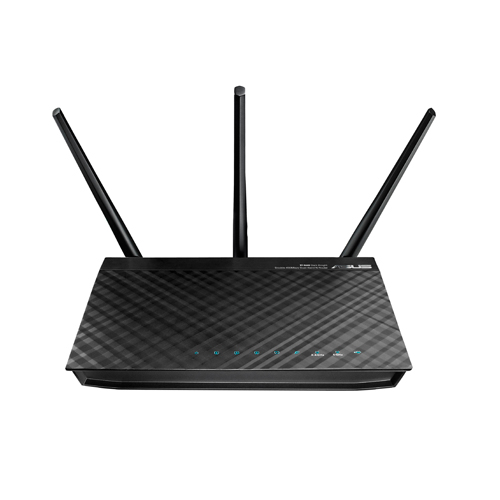
An old Asus router; you may not be able to get a new one.

Yesterday, the Federal Communications commission prohibited the sale of “new, foreign-made routers” in the U.S. Wired ran a good explainer with links to pertinent places on the FCC web site.

As I have explained to many people many times, the AyrMesh Hubs are not routers – they are just WiFi access points and associated equipment – none of them do any routing, filtering, or throttling. Furthermore, they have all been previously approved by the FCC – they are not “new” models. So, as far as we can tell, they are not covered by the FCC ban.

To review briefly, the concern the FCC has is that foreign-built routers have foreign-built firmware, which can contain “back doors” that could be used for stealing data or disrupting networks. There have been “worms” in the wild that have infiltrated consumer-grade routers (and enterprise-class routers, I should add…) and caused problems, so it’s not an entirely crazy idea.

The AyrMesh products, first, are not routers and should NEVER be connected directly to the Internet – they should only be used on a private subnet behind a router. Second, the AyrMesh products are all based on a version of the open-source OpenWRT Linux distribution, which is constantly under review for security bugs, and which we review before we include it on our products. Finally, of course, we’re not going to put in any software that might exfiltrate your data or cause network instability. So, even though the hardware (electronics and plastic cases) are manufactured overseas, we have complete control over the software (that actually makes it work). I am not worried about AyrMesh products being prohibited currently.

Of course, future FCC decisions are uncertain. We have AyrMesh Hubs and Receivers in stock now; if you have been considering getting an AyrMesh network for your farm, there’s no better time than the present.

The 1-Mile WiFi Camera – Almost!

1-Mile Camera
1-Mile Camera, from Kickstarter campaign.

If you haven’t seen the ads, here’s a link to the new Kickstarter for the “1-Mile WiFi Camera.”

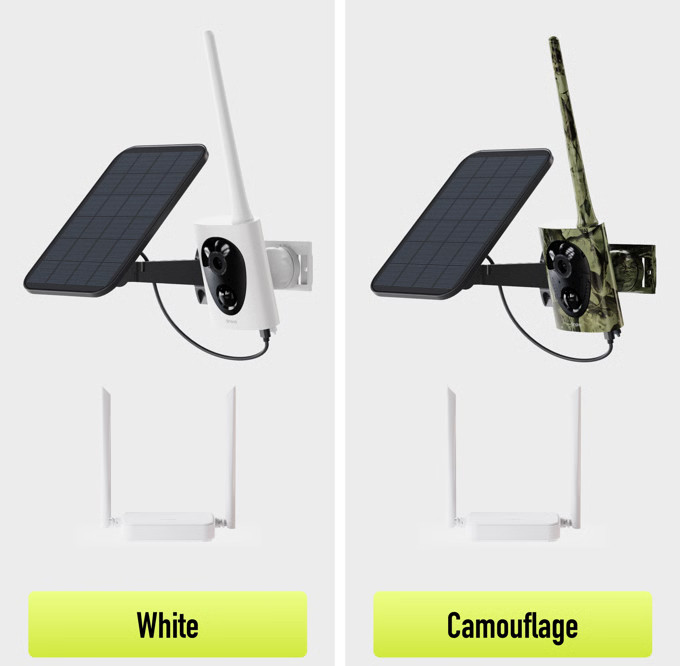
TL;DR: this is a really cool idea, and I like it. However, these cameras won’t work with “normal” WiFi like AyrMesh; they use a special form of WiFi called “WiFi HaLow” (802.11ah), which requires a separate access point. They also sell an access point, but it’s an indoor-only unit that cannot be mounted outdoors, and I’m not entirely sure the effective range of the cameras will be longer than a good WiFi camera with an external antenna and one or more AyrMesh Hubs. I think they’re significantly over-stating the capabilities of the system – it might reach a mile under optimal conditions, but probably not in most conditions. All that said, I still think it’s really cool, and I’ll be excited to hear from folks who use it.

Long-Winded Explanation

I was really excited to see this, because I have been trying to get camera vendors to build long-distance WiFi cameras: battery-operated cameras with solar panels and large, external antennas to extend the range of the cameras to the WiFi access point (like an AyrMesh Hub). The only ones I know of are the Reolink Argus Eco line of cameras. Although they come with relatively small, low-gain antennas, some of the models have RP-SMA antenna connectors that can accept a higher-gain antenna (which you’d have to buy separately – something like this or even this) to maximize their range.

The “1-mile WiFi Camera” does use batteries, a solar panel, and a nice, big, external antenna, which was exciting for me to see. However, closer inspection reveals that it uses WiFi, but only a special and seldom-used form of WiFi called “WiFi HaLow.” This special kind of WiFi has been around for several years, but it is seldom used because it operated on the 900 MHz. band, so very few devices are equipped to connect to it.

Using 900 MHz. is a good idea – it has historically been significantly less congested than the “normal” 2.4 GHz. (2400 MHz.) WiFi band. Because it uses a significantly lower frequency, it is also significantly less affected by obstructions like trees, bushes, and even non-metallic walls. Make no mistake: it’s still at the low end of the “microwave” spectrum, so the signal is still weakened by those obstructions, but not as much as 2.4 GHz. WiFi (and much, much less than 5.8 GHz. or 6 GHz. WiFi, which are not that useful for outdoor WiFi).

I had hoped that 802.11ah might be included in the 802.11ax specification, also known as “WiFi 6,” but it wasn’t. I then hoped it might be included in the 802.11be specification, known as “WiFi 7,” but that didn’t happen, either, so 802.11ah “WiFi HaLow” remains a separate and distinct form of WiFi with very few supported devices.

Because of this, the folks behind the “1-Mile Camera” also sell a WiFi HaLow access point to provide the signal for the camera’s use. This access point is just like the AyrMesh Gateway Hub – it needs to be connected to your router and positioned as high as possible for maximum range. However, it is an indoor device, so you want to get it up on an upper floor or in the attic for maximum range. It’s disappointing that they don’t offer an outdoor access point, because, like the AyrMesh Hubs, that would be more effective.

I should mention that outdoor HaLow access points do exist; Rokland carries an Alfa access point that should work well with these cameras.

One other little fly in the ointment is that, while I mentioned earlier that the 900 MHz. band has historically been less congested, that is changing quickly with the widespread use of LoRa. LoRaWAN has become popular for long-distance, low-bandwidth connections using the same 900 MHz. band, and new “modes” for LoRa like Meshcore and Meshtastic are increasingly popular. All of these add noise to the 900 MHz. band, making it harder for the wide-banded HaLow to work well. The 900 MHz. band is only 26 MHz. wide, and HaLow channels are 16 MHz. wide, so there isn’t even room for two non-overlapping channels. However, HaLow can use OFDM, meaning it divides that 16 MHz. channel into 1-MHz. wide sub-channels, so it can be pretty nimble about “stepping around” interference. However, having to ignore some of those sub-channels reduces the bandwidth (speed) of the HaLow connection, and bandwidth matters much more for cameras.

Conclusion: Maybe Over-Hyped, but Still Interesting

So, to be clear, I think the “1-Mile Camera” claims are a bit overblown. I do think you could use a camera a mile away in perfect conditions: the access point in a high window in a multi-story building, looking out over a very flat area with no (or very few) obstructions and very little interference, and the camera also mounted quite high in the air. In normal operation, I’d expect quite a bit less… BUT I still think that’s pretty cool! I’m eager to hear how “real people” (not paid endorsers) find it.

My counter to the “1-mile camera” is pretty simple: meshing WiFi like AyrMesh can be used to extend regular WiFi (the kind “normal” WiFi cameras, your phone, your tablet, and your laptop use) out a mile, or 2, or 5, or more. This provides a lot more flexibility, because a lot more devices can use the network. It requires more setup than the “1-Mile Camera” promises, but I think any real, working solution will require a fair bit of work to extend a signal a long distance with good bandwidth. As much as I want to see HaLow succeed (and I really do!), I think that the 2.4 GHz. AyrMesh solution is much more practical for the forseeable future.

We’ll be interested in hearing what you think about this.

WiFi Range – The Long and Short of Hybrid Mode

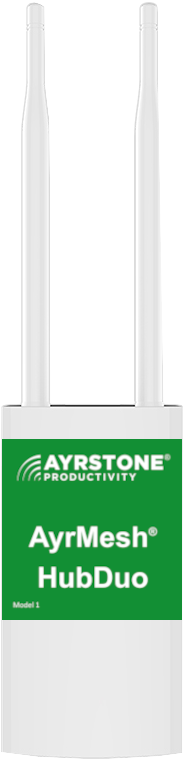
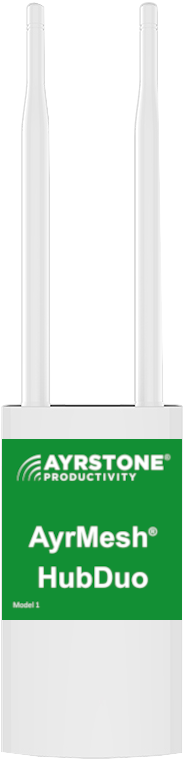
AyrMesh HubDuo
AyrMesh HubDuo

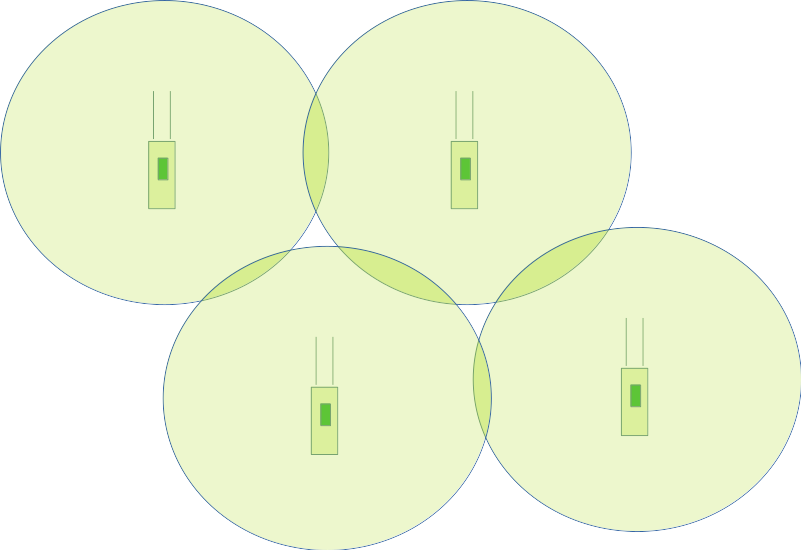
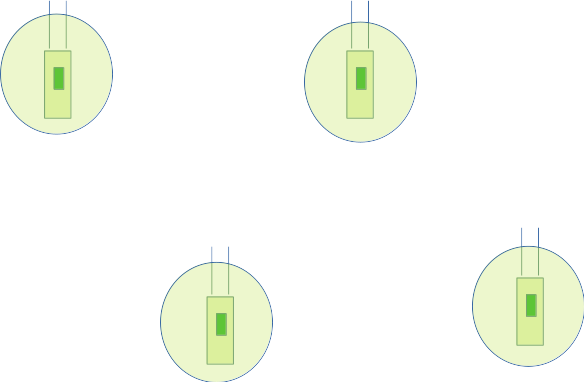
In the first article of this series, we covered how the AyrMesh HubDuo can be used to provide a relatively dense, continuous “cloud” of WiFi over a relatively small area (hundreds to low thousands of acres). In the second article in this series, we covered how to use the AyrMesh Hub2 series (the AyrMesh Hub2x2 and Hub2T) to create a “sparse” mesh across a huge area – many thousands of acres.

Four AyrMesh Hubs, with circles indicating range
Dense Mesh

However, you don’t have to choose one or the other. The AyrMesh HubDuo has a “Hybrid mode” that allows it to create a “close in” mesh between nearby HubDuo units for a relatively “dense” mesh and a mesh with distant Hub2 Units for a “sparse” mesh across your fields.

The way it does this is that it uses the 5.8 GHz. radio for the “close,” dense mesh and the 2.4 GHz. radio for the farther “sparse” mesh. The Gateway Hub has to be an AyrMesh HubDuo, because the Gateway turns the meshing for both radios on. The Remote HubDuos only have the 5.8 GHz. mesh radio on (they still have WiFi on both bands) and the Hub2 units further away, of course, only use 2.4 GHz.

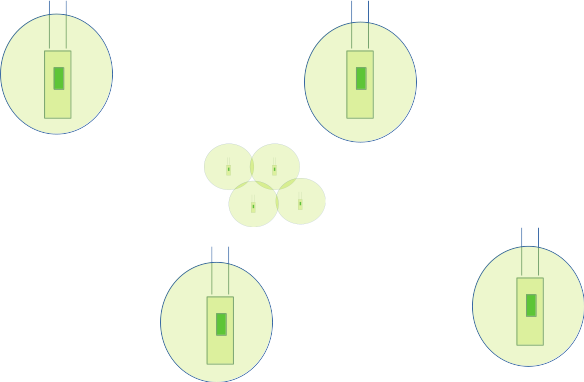
Four AyrMesh Hubs, very far apart
Sparse Mesh

This gives you the option of starting with one option and later including the other – you’re not “trapped” with either. Even if you start with a “sparse” mesh using a Hub2 as your Gateway Hub, you can replace it with a HubDuo, expand the “close” network using additional HubDuos, and use the Hub2 as a Remote elsewhere on the farm. Any Hub can serve either role.

Hybrid Mesh – Dense Mesh near the Gateway, Sparse Mesh Further Away

The AyrMesh WiFi Mesh is flexible and modular, designed to provide you with a way to cover the ground you need with strong, reliable WiFi. Once you have the network for one purpose, whether it’s to provide WiFi in your farmyard or across your fields, you may discover just how handy it is in other places. The modularity of AyrMesh allows you to quickly and easily extend your network as needed.

Please let us know in the comments what you think about this – are we on the right track, or are there other things you’d like to see? What benefits have you seen from extending your network? What has kept you from expanding your AyrMesh network further?

WiFi Range – Why Long-Distance Meshing Matters

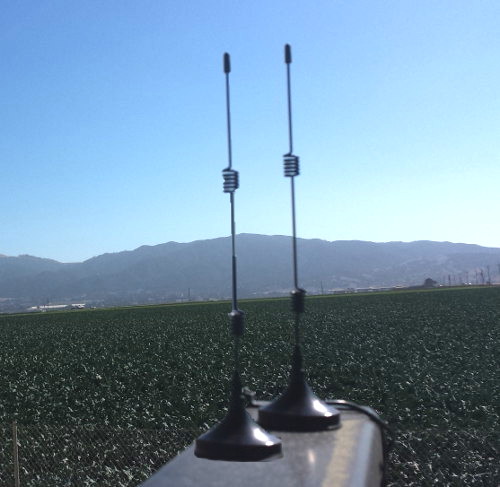
AyrMesh Cab Hub antennas on tractor
AyrMesh Cab Hub Antennas

On the last blog post, we showed how meshing can expand continuous WiFi coverage across a large area – up to hundreds of acres – using the AyrMesh HubDuo.

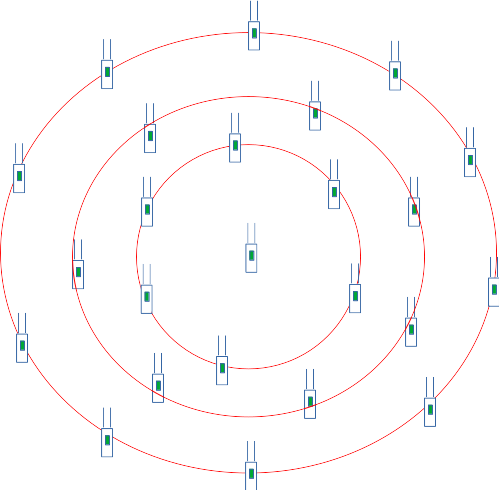
We recommend using no more than three “hops” over Hubs across your network to maintain good bandwidth (speed). To maintain consistent continuous coverage for a smartphone, the Hubs should be positioned about half a mile apart. The usual way to think about the network is as a set of concentric “rings” around the Gateway Hub, so, in this case, the last ring of Hubs are only a mile and a half from the center. With the coverage extending an additional quarter of a mile from the outer Hubs, that would provide a circle of WiFi out 1.75 miles from the Gateway Hub (3.5 miles across).

Three rings of AyrMesh Hubs
Three “rings” of AyrMesh Hubs

Calculating the area, we find that “maximal ring” of Hubs covers 9.6 square miles, or over 6,000 acres – an impressive area! However, of course, your Internet source is not always in the center of the property, and you may not want to go to the trouble and expense to place enough AyrMesh Hubs to provide WiFi so you can walk through your fields with continuous coverage.

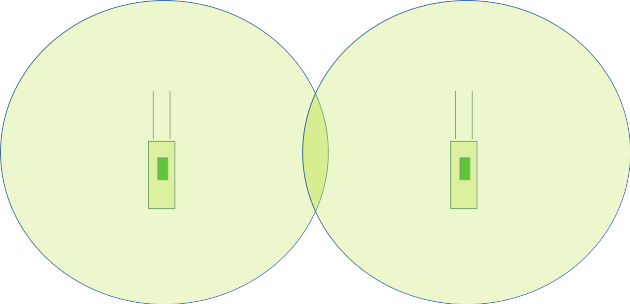
We realized two things: first, the Hubs (especially the “Hub2” series – The AyrMesh Hub2x2 and AyrMesh Hub2T) can be placed 2.5 miles apart, so the density of the network could be much, much less. Second, of course, we understood that most farmers drive across their land using tractors, sprayers, combines, trucks, or UTVs. So, if we put an AyrMesh Hub on the vehicle they were driving, it would be able to connect to the stationary Hubs and provide WiFi in and around the vehicle, where people are actually working. The result is a mesh that’s very sparse and only exists in limited areas (from the perspective of a “normal WiFi device”):

Four AyrMesh Hubs, very far apart
Spot Coverage with AyrMesh Hubs

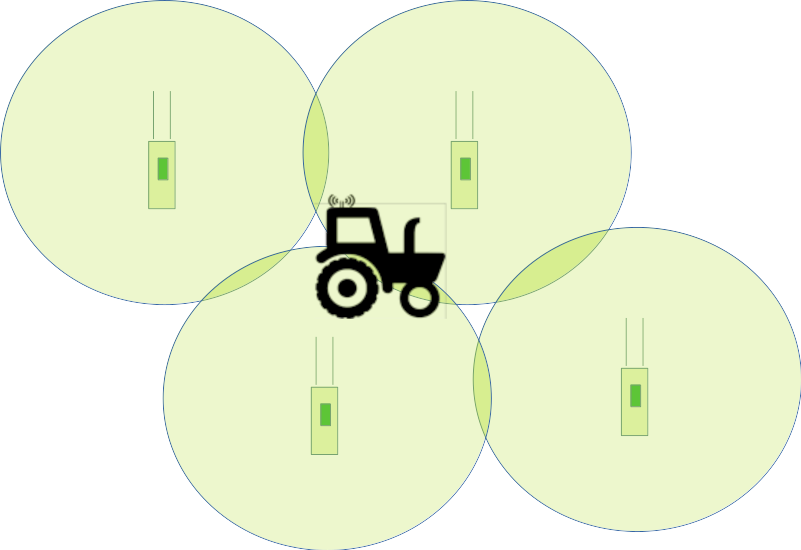
becomes a much more dense mesh with the addition of the AyrMesh Cab Hub:

As long as you are within a few hundred yards of the vehicle you brought out in the field, you’ll have good WiFi coverage, even though the nearest stationary Hub may be over a mile away.

Using the same math we used before, we can place the Hubs 2.5 miles apart, so three “rings” of Hubs places the last Hub 7.5 miles away from the Gateway Hub. Assuming the Cab Hub can go a mile beyond the last Hub and still have very good connectivity, that gives a circle with a radius of 8.5 miles or a diameter of 17 miles. A circle 17 miles across is an area of over 226 square miles, or over 145,250 acres. Even in Texas, that’s a pretty big spread.

It should be noted that we recommend three “hops” because, each time the signal “hops” across a Hub, the available bandwidth is halved. As a result, the bandwidth after the third Hub is only 1/8 the bandwidth of the Gateway Hub. However, a fourth and even a fifth hop may be possible to provide signal to low-bandwidth devices like sensors and actuators.

Your mileage will vary (you see what I did there…) – very few farms have huge continuous acreage like this, and covering non-contiguous acreage is trickier – that’s one of the reasons we introduced the AyrMesh Bridge.

However, the result is that you can cover a LOT of acreage using AyrMesh Hubs. So we have covered how to have a relatively “dense” mesh over a smaller area and a “sparse” mesh over a much larger area. Amazingly, using the AyrMesh Hubs, you can have BOTH kinds of network at once – a dense network over one area and a sparse network out over your fields. We’ll cover that in the last installment of this series.

WiFi Range – Why Meshing Matters

AyrMesh Hub
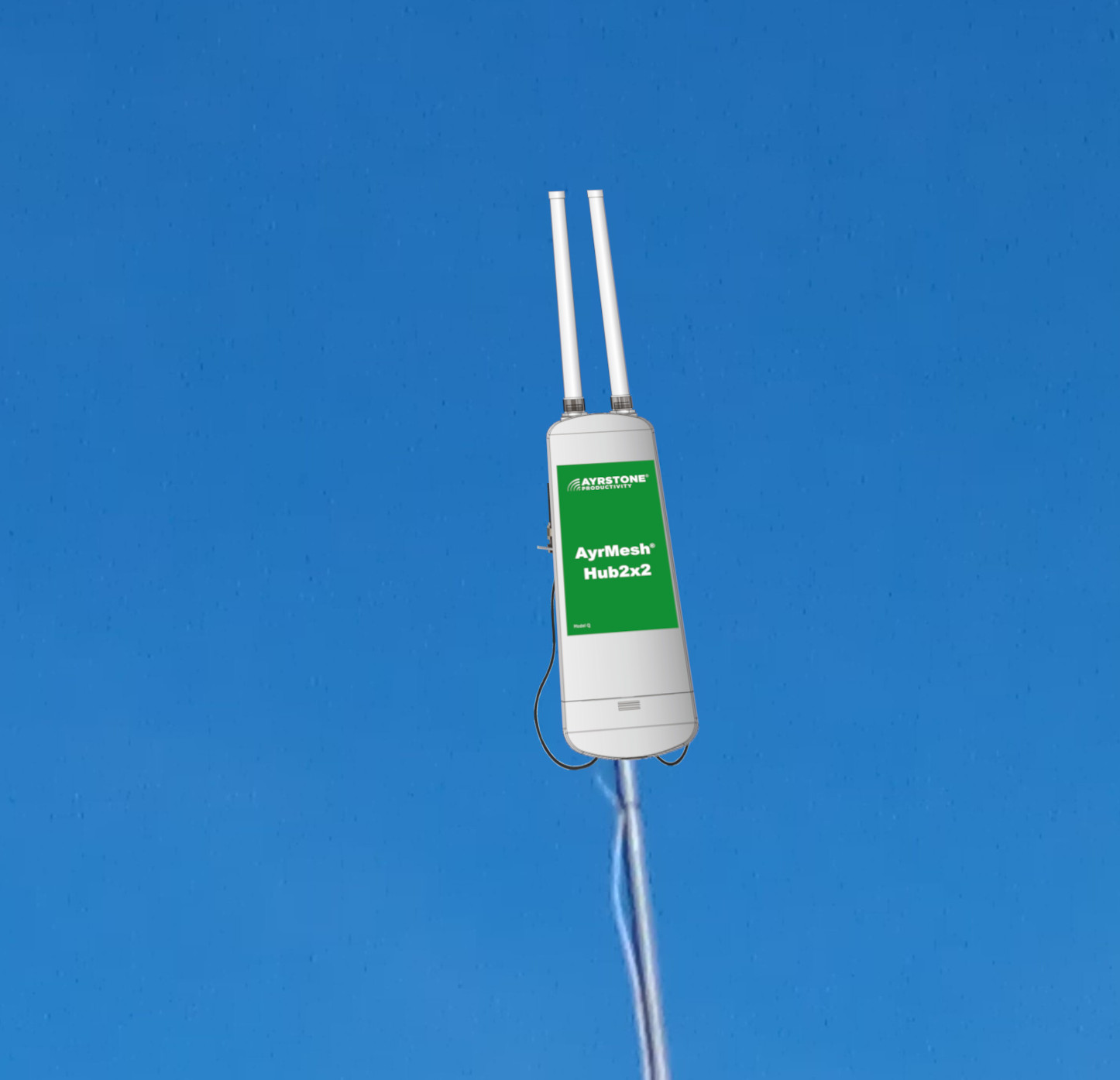
AyrMesh Hub2x2 set up as a Gateway Hub

We get a lot of questions about the range of the AyrMesh Hubs. We do have a fairly good explanation of the range of the Hubs on Ayrstone.com, but there have been enough questions and, especially, comments on Facebook, that I decided to write a good blog post about it.

The AyrMesh Hubs offer the longest “omni-directional” WiFi range available, because they use the highest possible legal power with the highest-gain antennas.

WiFi is intrinsically a “2-way” communications medium. The Hub has to be able to transmit a signal out to whatever device you’re trying to connect AND receive a signal back from that device. The high power and high-gain antennas help cast the signal out a long ways, but the high-gain antennas also “pull in” the signal from your device, which is almost always weaker than the Hub’s signal, and that what limits the Hub’s range.

Because the Hubs have powerful radios and large antennas, they can communicate with each other up to 2.5 miles (4 km) apart. However, since a small, battery-operated device with a tiny internal antenna (think an iPhone or a Ring camera) has a tiny fraction of that output power and antenna gain, the range to that device will be MUCH less – usually a few hundred yards. The Hub is already extending the device’s range far beyond what the manufacturer ever imagined – those devices are designed for a range of 100 feet or so for use in a typical home or office.

So the range of a single Hub is excellent – a few hundred yards to a phone or up to half a mile to a laptop, but, wait, we claim we can get you wireless across your farm, right? Are we just terrible liars? Schemers? Scammers? (see numerous social media posts…)

Here is the “magic” of meshing – using additional Hubs, you can extend the range of a single Hub out far away, in every direction, for miles. Remote Hubs are like “repeaters” – they receive the mesh signal from one Hub and create a new, “fresh” (same power) WiFi signal for devices to connect to, and a new mesh signal for other Hubs to connect to. Because of this, you can “daisy-chain” Hubs out across your farm for a long ways.

There are two ways to create the mesh on your farm, which we call “spot” and “continuous,” but they’re not necessarily mutually exclusive. To start with, we’ll just talk about the “continuous” method.

AyrMesh HubDuo
AyrMesh HubDuo

When you’re thinking about WiFi coverage, you’re usually thinking about continuous coverage so you can wander freely, using your phone without interruptions. Since your phone has fairly limited range, your Hubs have to be fairly close together. The AyrMesh HubDuo is perfectly suited for this kind of installation, because HubDuos can be spaced relatively closely together – as close as a few hundred feet apart using a HubDuo-specific feature called “close mode.

There is a real danger in placing the Hubs too close together: as mentioned, the Hubs have very powerful signals – much more powerful than the devices connecting to them – so, if the Hubs are too close together, those powerful signals can “overwhelm” the nearby Hubs so they can’t “hear” normal WiFi devices. For a phone or laptop between two Hubs that are too close together, trying to “talk” to one of the Hubs is like trying to have a normal conversation at a rock concert: the Hubs are “talking” so loudly your device can’t make itself heard.

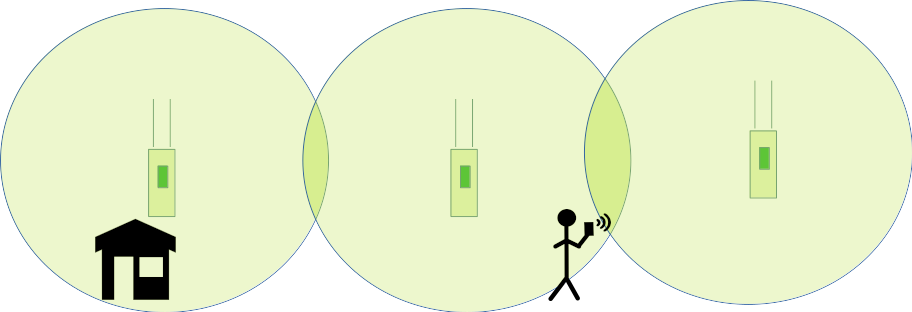
So, how do you determine where to site Remote Hubs? For continuous coverage, it’s actually pretty simple: with the device you’re going to be using the most (or most critically), just walk away from the Hub in the direction you want to extend the network until you start to lose the signal on that device. Then site a Hub about twice that distance away:

Two AyrMesh Hubs, showing circles of range

The circles indicate the maximum range from the Hub to your target device – it’s good to leave a little overlap so you’ll have continuous coverage as you go from one Hub to the other.
You can continue this process with additional Hubs:

Four AyrMesh Hubs, with circles indicating range

…and so on to cover the area you want. Note that, with the AyrMesh HubDuo, these can be as close as 200 yards or so (sometimes closer if there are trees, etc.), so you can have intensive coverage over a “smaller” area (under a hundred acres). They can also be placed a mile or so apart (with good “line of sight” between them) for “continuous coverage” for higher-power devices like laptops or cameras with external antennas. We recommend going no more than three “hops” from the Gateway Hub, but, with the Hubs placed a mile apart, you can have good signal for a laptop out up to three and a half miles.

This is fine for hundreds of acres, such as a farm yard, smaller farm, nursery, or other rural business. For a large production farm, we generally recommend using the “spot” method – we’ll cover that in the next post.

Why Wireless Farm Networking?

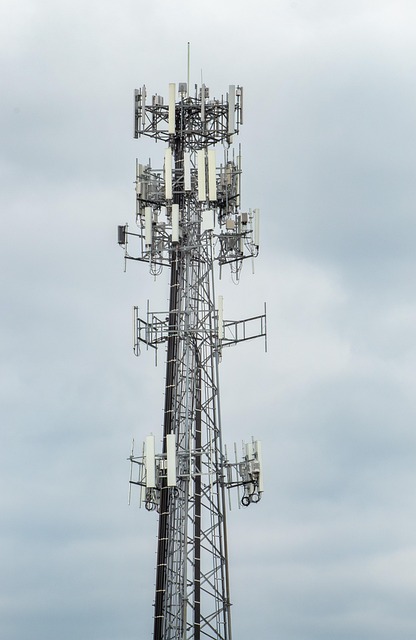
communications tower
Ummmm… maybe not for the farm… (Image by jotoya from Pixabay)

A Wireless Farm Network is simply a wireless data network used to move data around on a farm. Do you have a Wireless Farm Network? Do you have more than one? Do you need one? Do you need more than one?

You may be thinking, “a WHAT??? Is this the new buzzword from some Silicon Valley company that’s going to be gone in a week?”

But it’s not a buzzword or an advertising slogan; I argue that it will be as indispensable as the tractor, but something you will use all the time, in-season and out. In fact, you may already have one or more Wireless Farm Networks.

The Past

When we started on AyrMesh 15 years ago, people scoffed at the idea of a wireless network to cover an entire farm. “Why would a farmer need WiFi?” was a frequent question we received, and we patiently explained to anyone still listening that farming was going to become much more data-driven and much more automated over time. Farmers would need networks to move that data and enable automation, and the world has pretty much settled on Internet Protocol (IP) as the normal way to move data. Burying Ethernet cables and fiber across the farm is not really practical, so farms would be using wireless networks, and WiFi is simply the only feasible choice.

Freewave radio
Freewave 900 MHz. radio (courtesy of Freewave)

The funny part is that a lot of farmers already had rudimentary Wireless Farm Networks even then. I had come out of the auto-steering industry, and we had used 900 MHz. data radios to transmit corrections from RTK bases out to the “rover” units on tractors, sprayers, and combines. We even made “repeater” units to enable a very rudimentary “mesh” with those units. Some farmers used those same radios (which connected to RS-232 serial ports) to monitor weather stations, soil moisture probes, and to control irrigation systems.

Early soil sensors

In the mid-2000s, some vendors started to come out with soil monitoring systems based on 802.15.4 (Zigbee and others) meshing – very low-power, low-bandwidth intended for home automation. It was somewhat useful, especially for smaller operations and specialty crops, but quite a number of companies went out of business trying to make a market for these products.

LoRa logo
LoRa logo

Later, a company called Cycleo introduced products similar to Zigbee (low-power, low-bandwidth) called “LoRa,” but, instead of using meshing, they used good antennas and very low bandwidth to achieve very long range – up to 6.2 miles (10 KM). Cycleo was acquired by Semtech, which put a lot of marketing push behind LoRa and LoRaWAN. Several companies have adopted LoRa as a farm network of sorts for communicating to very low-power, low-bandwidth devices like sensors and simple controllers, and it works very well for sensors and other devices that need to run for long times on batteries and don’t need to use much data.

In 2010, Ayrstone introduced our first generation of AyrMesh Hubs for meshing WiFi, with the current Hub2 line coming out in 2013. WiFi has the advantages of being:

  • Low cost – WiFi access points like the AyrMesh Hubs are based on very high-volume chips and designs, so can be made quite inexpensive
  • Standard – There are a lot of things that can use WiFi – phones, tablets, laptops, cameras, sensors, actuators – because it’s an international standard, there are myriad vendors for the base technology (WiFi radios) that can be integrated into literally millions of products
  • High Bandwidth – Even long-range WiFi like AyrMesh can achieve bandwidth in the tens of millions of bits per second (Mpbs), much more than the thousands of bits per second (Kbps) like the old data radios or hundreds of thousands of bits per second like LoRa.
  • Low latency – since WiFi uses an IP network, devices on the network can “talk” to each other, as well as to the Internet, and latencies (the time it takes for data to get from one device on the network to another) are typically a few milliseconds.
  • Familiar – everyone has WiFi in their homes, businesses, stores, cafes, restaurants, and many cities even have municipal WiFi for public use. Everyone has it and knows how it works.

The Present

Currently, all these technologies are still in use, in varying degrees. There are still 4800 and 9600 “baud” data radios on some farms and there are still some “Zigbee” networks out there, but they are disappearing because they have been eclipsed by more modern technologies. Perhaps more importantly, most of those radios were designed so they’d only work with the same vendor’s radios, and most of the vendors for these systems have stopped building those products or gone out of business, so replacements are unavailable.

Cellular has become a viable alternative in some places, but, first, the cellular network is not under the control of the grower, it’s under the control of the service provider, so they decide the coverage and the available bandwidth. Also, every device using the cellular network requires a “subscription” with the carrier, and those costs can add up very quickly. Finally, cellular data goes directly to the public Internet; there is no option to keep your data on the farm. You may be able to pull your data off “the cloud” and onto a device on your farm, but it will have to go up to “the cloud” somewhere.

Recently, satellite connections have come to market as an alternative – I know of at least one autonomous sprayer company using satellite data communications. While satellite data solves the problem of having to be close to a cellular tower, they require clear line-of-sight to the sky, which can limit effectiveness in some situations. All devices connecting to the satellite also need subscriptions, so this cannot be an effective solution for applications requiring significant numbers of devices (e.g. soil sensing).

While LoRa and other low-bandwidth modes may be useful for some situations (again, soil sensing as an example), there are still important reasons to have a WiFi network. A WiFi network can provide “backhaul” for a LoRa-type network, so the LoRa gateway does not need to be connected to the cellular network, as is common now. As noted earlier, there are many, many devices that can connect to WiFi, from phones to security cameras to weather stations and other sensors. Very few devices can connect to LoRa, and the vendor may exclude devices other than their own from connecting to their network. Once you have a WiFi network across your farm, you have a lot of flexibility for easily adding a lot of different devices from a wide variety of vendors because WiFi is a global standard.

Importantly, WiFi is still evolving – modern 802.11ax (WiFi 6) is fully compatible with older versions of WiFi like 802.11n, but offers greater efficiency for improved bandwidth and reliability. 802.11ax also includes features like Target Wait Time (TWT), which allows battery-operated devices like sensors to connect while using minimal power, much like LoRa, effectively eliminating the need for a second “sensor network.” Building your Wireless Farm Network now will give you good connectivity today, and future-proofing for tomorrow.

There is a danger of different products using different networks, leading to the presence of numerous Wireless Farm Networks on a farm. Vendors have wanted to be able to “own” the entire installation for their products, including the wireless network they use. The upshot is that you can end up with one wireless network for soil sensors, another for your grain bins, another for autonomous machinery, etc. The end result is a tower like the lead graphic for this blog post: a Gordian Knot of complexity, with vendors fighting each other (and blaming each other) and no control for the grower.

I want to encourage all AgTech vendors, and I want farmers to encourage the vendors they work with, to simplify and use WiFi as the wireless network (or at least an optional wireless network) for new AgTech products. If a product depends on cellular data connections, recognize that limits its usefulness for the vast majority of farms and build in an inexpensive, universally-applicable WiFi alternative. We’ll help. Similarly, if your product is using LoRa, look at using 802.11ax instead to drive down cost, complexity, and vendor lock-in.

I’ll be at World Ag Expo next week; if you’re going to be there, please drop me a line at [email protected] and let’s try to meet up.

“Modes” for AyrMesh HubDuo (and Black Friday coupon!)

We have always focused on the longest range in the AyrMesh Hubs – best possible range to any given WiFi device, as well as maximizing the range (distance) between the Hubs to cover the maximum area.

And that has worked really well – tens of thousands of people across North America have gotten AyrMesh Hubs and have set up WiFi networks on their farms to enjoy outdoor WiFi for convenience, security, and productivity.

A small number of customers have been frustrated by the Hub’s long range, however, because the AyrMesh Hubs do not work well if they’re too close together. Some customers have more intricate central areas on the farm where they need to have several WiFi access points to “fill in” around buildings and other structures. It’s usually impossible to successfully place the AyrMesh Hubs within half a mile of each other, and that was much too large a span for many of these facilities. By reducing the power, we could enable customers to put the Hubs within 400 yards of one another, but, for many customers, that was still too far apart to support their physical plant.

AyrMesh HubDuo Modes

Because the AyrMesh HubDuo has both long-range 2.4 GHz. and high-bandwidth 5.8 GHz. radios, we have the option of moving the meshing from the 2.4 GHz. signal to the 5.8 GHz. signal, which allows the HubDuos to be placed much closer to one another – as close as a few hundred feet.

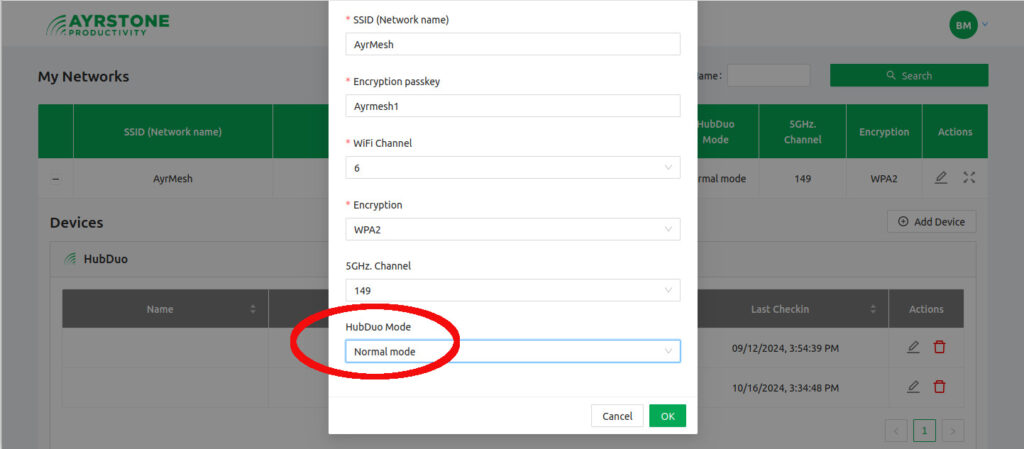
To support this, we have introduced four “modes” for the AyrMesh HubDuo, selectable in the “Network” section of your account on AyrMesh.com:

  • Normal mode – Compatible with the AyrMesh Hub2 series (Hub2n, Hub2T, Hub2x2, Hub2x2C) – meshing on the 2.4 GHz. signal. This mode works just like the other AyrMesh Hubs, with the addition of a 5.8 GHz. WiFi signal for shorter-range higher-speed connectivity.
  • Close mode moves the mesh signal to 5.8 GHz. so the HubDuo units can be placed much closer together. Transmission signal strengths are reduced, to avoid having the Hubs “overwhelm” each other when they’re closer. Both the 2.4 GHz. and 5.8 GHz. WiFi signals are available for use.
  • Hybrid mode makes both bands available for mesh signals on the Gateway Hub, with Remote HubDuos only meshing on the 5.8 GHz. mesh. This allows a close-in mesh of HubDuo units meshing on the 5.8 GHz. signal and a further-away mesh of Hub2 units on the 2.4 GHz. signal.
  • Access Point Only mode – this mode turns meshing off entirely. This is useful in cases where existing infrastructure exists to distribute connectivity around the area and only outdoor WiFi is needed from the Hubs.

It’s very easy to select the HubDuo mode in AyrMesh.com – under “My Networks” click on the pencil to edit your network settings. At the bottom of the panel, you’ll see “HubDuo Mode” – select the mode you want from the dropdown menu.

For more information, see the article on Ayrstone.com or the support information on our support site. Or just get an AyrMesh HubDuo today!

Coupon code

To make it easier, we’re offering 15{6d84e97b9d70a88c7827a68919bdc428927c26a1a62ff29e804188d6763d834c} off Ayrstone AyrMesh Hubs, Receivers, IndoorHubs, and Bridges until the end of the year. Just use coupon code “ayrxmas” on your order on Ayrstone.com.

Happy holidays to all – we’re looking forward to a great 2025!

Introducing the new AyrMesh HubDuo!

We are very pleased to introduce a new generation of AyrMesh Hub – the new AyrMesh HubDuo! If you order between now and October 31, you can get $30 off our special intro price of $349.95, bringing the price to only $319.95 – please use coupon code “hubduointro” for the extra discount.

The HubDuo is the first AyrMesh Hub to feature dual-band WiFi – using both the traditional 2.4 GHz. band and the 5.8 GHz. band for higher bandwidth combined with the same long range as the rest of the AyrMesh Hubs.

The HubDuo uses a single SSID (network name) for both the two WiFi radios. The result is that you can connect to the 5.8 GHz. WiFi when you’re close to the Hub and get up to 100 Mbps bandwidth (speed). Then, when you move away from the Hub, your device will automatically move to the 2.4 GHz. WiFi, where you can get up to 65 Mbps, with bandwidth reducing as you move further away.

The ultimate range of the Hub is similar to the rest of the AyrMesh Hubs, because it still has high-gain antennas to “hear” very faint signals from a long distance away. So there’s really no tradeoff – you get the same long range as the rest of our Hubs with the extra benefit of blazing-fast speed at short range.

The other main benefit of the AyrMesh HubDuo is that the output power can be adjusted so the Hubs can be placed much closer together than our other Hubs. Whereas the Hub2x2 and Hub2T need to be generally be placed at least a mile apart (so they don’t overpower each other), the HubDuo can be places as close together as a few hundred yards with proper adjustment. Just contact Ayrstone support if you need to place the Hubs less than half a mile apart and we’ll adjust the power.

The HubDuos use standard 802.11s meshing, so they will mesh with existing AyrMesh Hub2 devices (Hub2x2. Hub2T, Hub2x2C, and even the Hub2n). The HubDuo makes a great replacement Gateway Hub for your existing AyrMesh network. The HubDuo also makes use of the same external housing we used for the AyrMesh Hub2x2C, making it compact and easy to install and maintain.

We have plans to offer additional features for the AyrMesh HubDuo to give you even greater flexibility in deploying them, including the option for even more “dense” installations. Please watch this space for news – the new generation is going to open new frontiers in wireless farm networking.